

How to Develop a Mobile App Like Uber or InDrive in Flutter: Complete Guide + Source Code
How to Develop a Mobile App Like Uber or InDrive in Flutter: Complete Guide + Source Code
Have you ever wondered how applications like Uber and InDrive connect passengers with drivers and manage an entire trip from the beginning to the end?
In this tutorial, I will show you how to develop a mobile app like Uber or InDrive in Flutter by looking at a ride-hailing app that I developed.
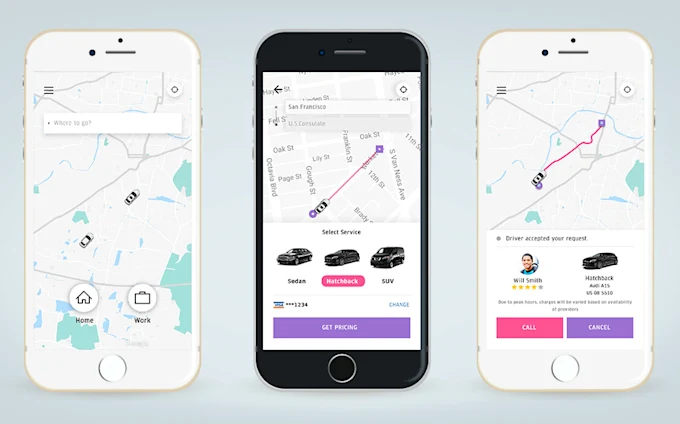
The app has two sides: a passenger mobile app and a driver mobile app. Both applications work together to handle the process of requesting a ride, accepting the request, starting the trip, completing the trip and handling payment.
The project also comes with source code, which means you can use it as a starting point for learning and building your own ride-hailing application.
Flutter is a popular framework for building applications from a single codebase across multiple platforms. The official Flutter documentation provides learning resources for building mobile applications, including UI, state management, networking and other important parts of app development.
How to Develop a Mobile App Like Uber or InDrive in Flutter
The idea behind the application is quite simple.
There are two major users:
- Passenger – the person requesting a ride.
- Driver – the person accepting the ride request and taking the passenger to the destination.
The two sides need to communicate with each other during the trip.
The passenger requests a ride, a driver accepts it, the passenger can see the driver’s movement, the driver picks up the passenger and the trip eventually ends at the destination.
This is similar to the basic flow used by modern ride-hailing platforms. Uber, for example, describes its own basic flow as entering a destination, matching the rider with a driver, picking up the rider and completing the trip.
1. Passenger and Driver Apps
The first thing you will notice about this project is that there are two sides to the application.
The passenger has a mobile app where they can register, request rides and view their previous trips.
The driver also has a mobile app where they can log in, go online and receive ride requests.
For the passenger application, a new user can sign up by entering details such as a username, phone number and password.
After registration, the passenger can access the application.
On the driver’s side, an existing driver can sign in using their login details.
This separation between passengers and drivers is important because both users have different things they need to do inside a ride-hailing application.
2. Passenger Dashboard
After logging into the passenger application, the passenger can access different sections of the app.
For example, there is a section for previous trips.
If the passenger has already taken some trips, those trips can be displayed in the trips section.
Since this is a new account in the demonstration, there are no previous trips at the beginning.
There are also other sections, including the user’s profile and information about the application.
The passenger can also log out when they are finished using the application.
3. Driver Goes Online
Now let’s move to the driver’s side.
Before a driver can receive ride requests, the driver needs to go online.
There is a Go Online option in the driver’s application.
When the driver clicks on it, the driver becomes available to receive ride requests.
This is an important part of a ride-hailing application because passengers need to be matched with drivers who are available.
Without this step, a driver who is not available could continue receiving requests.
4. Passenger Requests a Ride
Now that the driver is online, let’s go back to the passenger application.
The passenger selects a location and requests a driver.
When the passenger clicks on Get Driver, the application looks for an available driver.
After a driver is found, the passenger can accept the driver.
At this point, the ride request has moved from the passenger to the driver.
This is one of the main features you need to understand when learning how to develop a mobile app like Uber or InDrive in Flutter.
You are not just creating screens. You are creating a system where information needs to move between two different users.
5. Showing the Route on the Map
Once the driver accepts the ride, the application displays the route.
The passenger can see the direction from the pickup location to the destination.
The driver can also see the route on their side of the application.
This is where map integration becomes important.
A ride-hailing application needs to work with location information and maps so that both the passenger and driver can understand where the trip is going.
Flutter supports integration with platform capabilities and plugins, while applications can be built and deployed across supported platforms from a shared codebase.
6. Driver Arrives at the Pickup Location
Let’s assume that the driver has reached the passenger’s pickup location.
The driver can click Arrived.
The passenger can then see that the driver has arrived.
The application also displays important information about the trip.
For example, the passenger can see the driver’s name and vehicle information, including the type and colour of the car.
The pickup and destination information can also be displayed.
This type of information helps both sides understand who is involved in the trip and where the ride is going.
7. Starting the Trip
Once the passenger has entered the vehicle and the driver is ready to leave, the driver can start the trip.
The driver clicks Start Trip.
The application then changes the trip status to show that the driver is heading toward the drop-off location.
The map continues to show the route that the driver needs to follow.
As the driver moves, the application can update the location and display the progress of the trip.
This is one of the more important parts of building an Uber-like application because location tracking needs to work properly throughout the ride.
8. Ending the Trip
When the driver reaches the destination, the driver can click End Trip.
The trip then moves to the payment stage.
The application can provide options for payment, such as cash or online payment, depending on how the project has been configured.
In this particular demonstration, I selected the cash payment option.
The payment is then confirmed from the driver’s side.
Once the payment is confirmed, the trip is completed.
9. Viewing Driver Earnings
After completing a trip, the driver can check the earnings section.
This section shows the total amount the driver has earned.
The driver can also view previous trips.
This is useful because a ride-hailing application is not only about requesting and completing rides. Drivers also need to have access to their trip history and earnings.
The driver can also access their profile and log out of the application.
10. Viewing Passenger Trips
The passenger can also view their trip history.
After completing the demonstration trip, I went back to the passenger application and opened My Trips.
The completed trip was displayed there.
This allows passengers to keep track of their previous rides.
The passenger can also access their profile, view information about the application and log out.
What Is Included in the Flutter Uber-Like App?
The project demonstrates several important features that you would expect to find in a basic ride-hailing application.
These include:
- Passenger registration and login
- Driver login
- Passenger and driver dashboards
- Driver online/offline status
- Ride requests
- Driver acceptance
- Pickup and destination locations
- Map and route display
- Driver arrival status
- Starting a trip
- Ending a trip
- Cash payment confirmation
- Passenger trip history
- Driver trip history
- Driver earnings
- User profiles
- Logout functionality
The course also covers additional development areas such as Firebase connection, push notifications, changes to the trips page, currency configuration and preparing the project for testing.
Flutter Uber Clone Source Code
One of the useful parts of this project is that the source code is included.
This means you don’t have to start completely from an empty Flutter project.
You can download the passenger and driver source code, open the projects in your development environment and begin examining how the different parts work.
For someone learning Flutter, this can be useful because you can study an existing application and gradually understand how the different screens and features are connected.
However, source code should be treated as a starting point rather than something you simply copy and launch.
You will likely need to modify the application to fit your own requirements.
Can You Build Your Own Uber or InDrive Clone?
Yes, you can use a project like this as a starting point for building your own ride-hailing application.
However, building a real ride-hailing business involves much more than creating the mobile application.
You need to think about things such as:
- User authentication
- Driver verification
- Location tracking
- Ride matching
- Pricing
- Payment processing
- Notifications
- Customer support
- Database and backend infrastructure
- Security
- Driver and passenger safety
- App deployment
- Local transportation regulations
For example, Uber has safety features and driver screening processes that go beyond the basic ride-request functionality of a demo application.
So, a Flutter Uber clone can be an excellent technical starting point, but it should not automatically be considered a production-ready replacement for a large commercial platform.
Why Use Flutter for a Ride-Hailing App?
One reason Flutter is interesting for this type of project is that it allows developers to build applications for multiple platforms from a shared codebase.
The official Flutter documentation describes Flutter as a framework for building applications that can run across mobile, desktop and web platforms.
This can be useful when you want to build both Android and iOS versions of an application without maintaining completely separate codebases for every platform.
Of course, a real project still requires proper testing and platform-specific configuration where necessary.
Where to Get the Full Course and Source Code
I created a complete course around this project where I go through the application and explain how to work with the source code.
The course is available on Udemy:
Build Mobile App Like Uber with Flutter + Source Code (2025)
The course covers the passenger and driver applications, loading the source code, connecting the application to Firebase, push notifications, modifying the trips and other pages, and preparing the project for testing.
View the Flutter Uber-like app development course on Udemy
Final Thoughts
Building an application like Uber or InDrive can look complicated when you only look at the finished product.
But when you break it down into smaller parts, you can understand how the different pieces work together.
The passenger requests a ride.
The available driver receives the request.
The driver accepts it.
Both sides can see the route.
The driver arrives at the pickup location.
The trip starts.
The passenger reaches the destination.
The trip ends and payment is confirmed.
That is the basic flow demonstrated in this Flutter project.
If you are learning Flutter or planning to build a ride-hailing application of your own, working with an existing project and source code can give you a practical way to understand how the different components fit together.
You can then modify the interface, add your own features and connect the application to the backend services required for your particular project.
Flutter also provides official documentation and learning resources for developers who want to go beyond an existing project and learn how to build applications from scratch.
The source code and course are therefore not just about getting an Uber-like app quickly. They can also serve as a practical learning resource for understanding how a real-world ride-hailing application can be structured with Flutter.